GhostQR / URL shortener
Short link.
Room for change.
Share a short ghqr.au link. Change its destination later, even after the email is sent or the QR code is printed.
Paid plan required. Each saved dynamic QR code includes one short link and uses one dynamic-code allowance.
The link you share
ghqr.au/a1b2c3
Same address. Same QR code.
Where it leads
example.com/register
Open registration while tickets are available.
Illustrative example. This demo does not create or change a live link.
Use it online. Put it on paper.
One saved destination.
A link and a QR code to reach it.
Share the short link
Use the saved URL in an email, message or social post. You can share it without downloading the QR image.
Keep the destination current
Move from a registration form to event resources, or replace an old document with its latest version.
Understand activity
Review redirect activity in the dashboard. Add UTM parameters to your destination for campaign reporting on your website.
From destination to short link
Create it in the QR generator.
GhostQR manages the link and its QR code together. Start with a website URL and save it as dynamic.
1. Sign in and enter your destination
Open the dynamic generator, choose URL and enter the complete address. Check your paid plan allowance before saving.
2. Save the dynamic code
Keep Make it dynamic enabled and select Save. Use the saved link from your dashboard; the generator preview is not a published link.
3. Copy, check and share
Copy the ghqr.au URL from the dashboard and open it to confirm the destination. Share the link, download its QR code, or use both.
Already shared? Change where it leads.
Open the saved code and choose Edit destination. Replace the URL, save and test the original short link. Allow about 30 seconds for a cached destination to update.
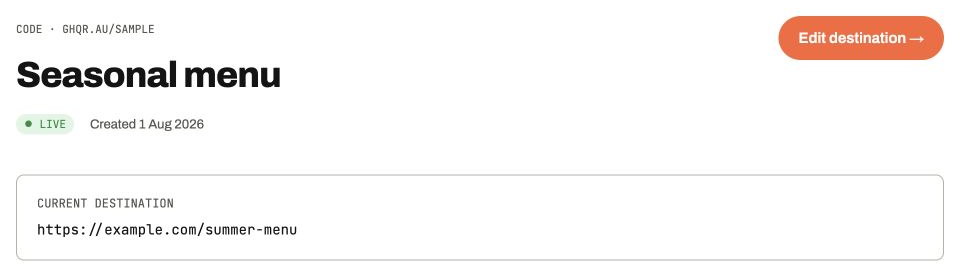
Product screenshot · illustrative sample data · select image to enlarge
The destination is editable from the saved code. Your shared short URL and existing printed QR pattern stay the same.
- Choose the right code
- Check its name, saved short link and current destination before editing.
- Save and test
- Open the original shared URL to confirm it reaches the new page.
Before you share
- Is this a free URL shortener?
- Editable short links are included with paid dynamic QR codes. For a fixed website address you only need to put on paper, the static QR generator is free.
- Can I tell a scan from a click?
- If you share the same URL in email and print, both reach the same redirect. Use separate saved codes and campaign tags for placements you want to compare. Redirect counts are not unique people or website conversions.
- Can I move an existing short link here?
- GhostQR creates links on ghqr.au. It cannot take over a link on another provider's domain. Read the provider migration guide before replacing a published link.
- What happens if I cancel?
- Unpaid dynamic links have a 12-month grace period before they stop resolving. Creating new dynamic codes requires an eligible paid plan. Paused, deleted or security-blocked codes can stop redirecting sooner, and the destination website must remain available.
Get more from your links
Give your next link room to change.
Create a saved dynamic code with an editable short URL.